Sales Quota Management
For products with a daily sales quota configured, partners can view and manage the available quota for specific dates. This feature helps control the number of units that can be sold per day for a particular product variant.
Activation Required
The sales quota functionality must be activated by discover.swiss support for each product by setting a default quota. Please contact support@discover.swiss to enable this feature for your products.
View Sales Quota
When you open a product that has a dailySalesQuota property defined, you can view the quota information in the Availability section of the product detail page. The system displays two important values for each day and each product variant:
| Column | Description |
|---|---|
| Konfiguriertes Kontingent (Configured Quota) | The maximum number of units configured for that specific day. If no specific quota is set for a day, this shows the default dailySalesQuota from the product configuration. |
| Verfügbares Kontingent (Available Quota) | The remaining number of units that can still be sold. This is the configured quota minus already sold/reserved units. |
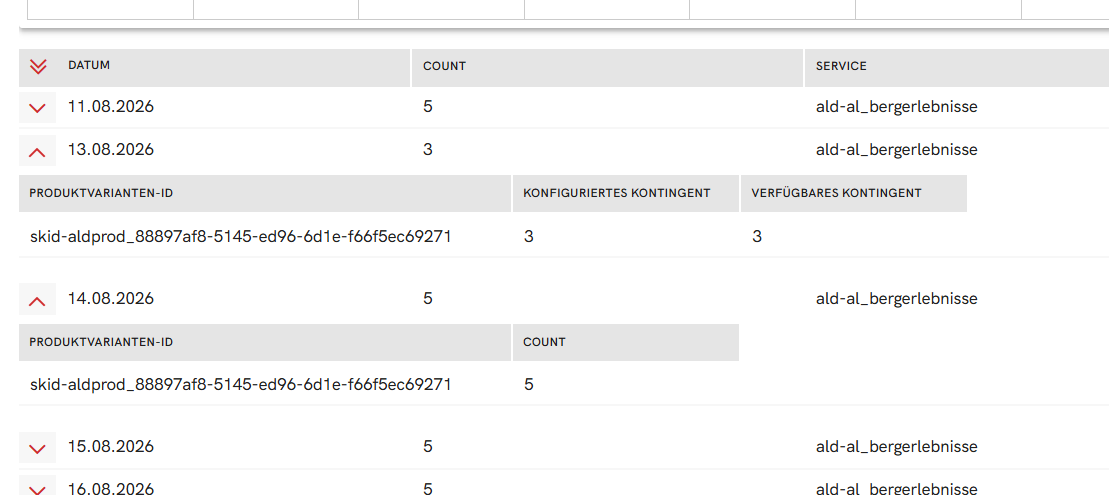
Availability Cache
The availability list shows cached availability data that is updated every 15 minutes. The sales quota values shown here are used during checkout and for availability calculations, but the cached display may be up to 15 minutes behind the actual current state.
Understanding the difference:
- Count in availability list: Shows the cached availability for the product, updated every 15 minutes
- Sales quota: The actual quota used in checkout and availability calculations (real-time)
The cached availability ensures better performance, but be aware that during high-demand periods, the displayed values might be slightly outdated until the next cache refresh.
Quota Visibility
Specific quota values for a date will only be visible in the availability list after they have been used for the first time on that date. Until then, the default dailySalesQuota from the product configuration serves as the count in the availability display.
Default Sales Quota
The default daily sales quota for a product is configured in the product definition and can be viewed in the product detail page:
- Open the product detail page
- Navigate to the Configuration tab
- Look for the
dailySalesQuotaproperty at the top of the configuration section
This default value applies to all days unless a specific quota has been set for a particular date.
Edit Sales Quota
Partners can set or modify the sales quota for specific dates using the "Verkaufskontingent bearbeiten" (Edit sales quota) action.
Permission Required
The edit action is only visible and enabled when the currently selected partner in the Partner Portal is listed as a source in the product's data governance. This is not purely role-based but depends on the product's ownership and data governance settings.
Display of quotas is available to all users without restriction.
Steps to edit sales quota:
- Open the product detail page
- Navigate to the availability section
- Open the Edit-Actions menu
- Select "Verkaufskontingent bearbeiten" (Edit sales quota)
- In the popup dialog, configure:
- Product variant: Select the specific variant you want to configure
- Date: Choose the specific date using the date picker
- New quota value: Enter the maximum number of units available for that date
- Click save to apply the changes
Important notes:
- Each quota setting applies to a specific date (period type: day) and a specific product variant (unit ID)
- Setting a quota for a date overrides the default
dailySalesQuotafor that specific day - If you want to remove a custom quota and fall back to the default, you need to delete the specific quota entry
- All quota changes are recorded in the audit trail with information about who changed what and when
Quota vs Availability
It's important to understand the relationship between sales quota and product availability:
Sales Quota: - Defines the maximum number of units that can be sold per day - Set by the product owner/partner - Used as the basis for availability calculations - Configured per variant and per day
Availability:
- Shows the remaining units that can still be sold
- Calculated as: configured quota - sold/reserved units
- Updated in real-time during checkout
- Cached for display purposes (refreshed every 15 minutes)
When a product variant is sold out for a specific day, the "Verfügbares Kontingent" (Available Quota) will show 0, even if the "Konfiguriertes Kontingent" (Configured Quota) shows a higher number.
Use Cases
- Seasonal adjustments: Increase quota during high season, decrease during maintenance periods
- Special events: Set specific quotas for event dates
- Capacity management: Control the flow of bookings based on operational capacity
- Sold out management: When a day shows no available quota, you can increase the configured quota if capacity allows
Audit Trail
Every time a sales quota is modified, an audit trail entry is automatically created. You can view these changes in the Audit Trail tab of the product detail page. The audit trail records:
- Who made the change (user identification)
- What was changed (date, variant, quota value)
- When the change was made (timestamp)
This ensures full transparency and traceability of all quota modifications.
Scope Limitation
This sales quota feature covers daily sales quotas on products only. Other sales quotas, like guest card quotas per lodging business (e.g., FLF guest cards), are not managed in the partner portal.