Field definition validation
General information
Product definitions have several properties which contain lists of fields with validation rules that apply in a specific object scope.
A field definition describes one input field: what it is called, what type of value it accepts, whether it is mandatory, what range the value must fall in, and under which circumstances it applies at all. Because the rules live in product configuration, the required information varies depending on the product and the product provider: to order a T-Shirt not the same properties are required as to buy a train ticket.
Info
On the backend these definitions are used to validate the data dynamically. For best user experience you should do this already on the client.
Field definitions should be used to build a dynamic UI which collects the necessary information for ordering different products.
Important
There can be several field definitions with the same propertyId in the same list of fields. That doesn't mean that the property has to be rendered twice — it means different validation rules are applied to the same property.
Scopes
Each list of field definitions validates a different object:
In Order context:
| Field definition list | Validated object |
|---|---|
customerField |
order.customer |
customerField with address. prefix |
the customer's billing / shipping address |
itemField |
order.orderedItem[i] |
travelerField |
order.orderedItem[i].orderedItem.traveler[j] |
vehicleField |
order.orderedItem[i].orderedItem.vehicle[j] |
itemField, travelerField and vehicleField are also used to validate get-offers requests — see Required for offers.
In Stay context:
| Field definition list | Validated object |
|---|---|
stayField |
the stay itself |
customerField |
stay.customer |
travelerField |
stay.member[i] |
travelerGroupField |
stay.group[i] |
Note
travelerField is used in both contexts against different objects: order travelers and stay members. A definition written for one context will also be applied in the other if the same list is configured, so the propertyIds must make sense for both.
Field definition properties
| Property | Type | Meaning |
|---|---|---|
propertyId |
string | Which value of the payload this definition applies to. See Providing values. |
type |
string | Value type. See Field types. |
additionalType |
string | Semantic role of the field. See Additional types. |
name |
string | Human-readable field name. Substituted into validation error messages. |
required |
bool/null | Mandatory for orders. Tri-state — see Required. |
requiredForOffers |
bool/null | Mandatory for offer requests. Tri-state — see Required for offers. |
possibleValue |
dictionary | Allowed values. Keys are the accepted values, values are display labels. Empty = unrestricted. |
rangeMin / rangeMax |
string | Value bounds. Interpretation depends on type — see Range validation. |
rangeBasePropertyId |
string | For date/datetime fields: the property the range is measured from. |
displayConditions |
array | Conditions defining whether this field applies at all — see Display conditions. |
customErrorNames |
dictionary | Override validation error messages per rule — see Custom error messages. |
readonly |
bool/null | Value cannot be modified — see Readonly. |
description |
string | Human-readable description of the field. Not used for validation. |
Legacy properties
parentFieldPropertyId, parentFieldValue, parentFieldOperator, parentFieldType and parentFieldModel are obsolete but still honoured — they are superseded by displayConditions. requiredErrorName is obsolete as well — superseded by customErrorNames. See Migrating from parentField properties.
Field types
type |
Expected value | rangeMin / rangeMax mean |
|---|---|---|
integer, int |
Whole number | Numeric bounds |
number |
Decimal number | Numeric bounds |
text |
String | — |
select, radio |
String; one key of possibleValue |
— |
media |
String (a media reference) | — |
medialist |
JSON array of strings | — |
bool |
true / false |
— |
date |
Date; any time component is ignored (in Swiss local time) | ISO 8601 duration offset |
datetime |
Date and time | ISO 8601 duration offset |
duration |
ISO 8601 duration (e.g. PT2H30M) |
ISO 8601 duration |
multiselect |
JSON array of strings; each item a key of possibleValue |
— |
array |
JSON array | Number of items |
checksum |
JSON array of strings | Sum of the selected child items — see Checksum |
checksumItem |
Whole number | See Checksum item |
label |
None — informational only | — |
A label field is not an input: it is used to display some text to the user and does not affect validation in any way. No value needs to be provided for it, and its required, requiredForOffers, range and possibleValue settings are not enforced.
Type names are matched case-insensitively: "Date", "date" and "DATE" are equivalent. A missing or unrecognised type is not an error — the field falls back to a plain existence check.
Additional types
additionalType marks the semantic role of a field. Most values are display or client-side hints; the only value that changes backend validation behaviour is sales-cut-off.
| Value | Description |
|---|---|
sales-cut-off |
Defines when the product stops being sellable — see Sales cut-off validation. The only value that affects backend validation. |
ProfileImage |
Profile picture of a person |
TravelerMediaImage |
Media image associated with a traveler |
SupportingDocument |
Supporting document (e.g. proof of eligibility for special conditions) |
AddonSelector |
Links this field to an add-on product. The client can resolve the add-on via the product ID stored in the field definition's parentFieldValue property |
WidthOneOfThree |
Display hint: field occupies one third of the row width |
WidthTwoOfThree |
Display hint: field occupies two thirds of the row width |
ageCategory |
Marks the field as an age category that is subject to age validation |
mask-keycard |
Input mask hint: the value is a keycard number — see Input masks |
mask-swisspass |
Input mask hint: the value is a SwissPass number — see Input masks |
An unrecognised additionalType value is ignored rather than rejected.
Input masks
The mask-keycard and mask-swisspass additional types tell the client to apply an input mask so the value is collected in the expected format (X stands for a digit):
additionalType |
Format |
|---|---|
mask-keycard |
XX-XXXX XXXX XXXX XXXX XXXX-X |
mask-swisspass |
SXX-XXX-XXX-XXX |
These are hints for the client UI — the backend does not validate the value against the mask.
Providing values
propertyId defines where the value of a field lives in the request payload:
Additional properties. A propertyId beginning with additionalProperty. (case-insensitive) refers to an entry of the payload's additionalProperty collection with the same propertyId:
{
  "propertyId": "additionalProperty.info1",
  "type": "text",
  "name": "swim experience",
  "required": true
}
{
  "additionalProperty": [
    {
      "propertyId": "additionalProperty.info1",
      "value": "good swimmer"
    }
  ]
}
{
  "additionalProperty": [
    {
      "propertyId": "info1",
      "value": "good swimmer"
    }
  ]
}
Note
Alternative request contains additional property defined with propertyId = info1 instead of propertyId = additionalProperty.info1. This is an alternative way of defining additional properties which works completely the same meanwhile the field definition propertyId always have prefix additionalProperty.* when targets at additional property.
Additional property values are always strings on the wire and are parsed according to the declared type. A value that cannot be parsed produces a "not allowed" validation error.
Object properties. Any other propertyId refers to a property of the validated object itself. Paths are dot-separated and case-insensitive — e.g. orderedItem.validFrom on an order item.
Note
For array-typed fields an empty or absent value counts as a valid empty array. Only a value that is present but is not a JSON array is invalid.
Validation rules
Required
When a field definition has the required property defined with value true, then this field must be present when the object is created or modified.
Value explanations:
null- field is not relevant for this producttrue- field is requiredfalse- field is not required, but can be provided and used
Required for offers
Properties which have the requiredForOffers property defined with a value different from null will be used to validate get offers requests.
Value explanations:
null- field is not used for offertrue- field is required for offerfalse- field is not required for offer, but can be provided and used in offer requests
Note
For both flags the distinction between null and false is meaningful, and only true enforces presence. A value that is provided is still validated against type, range and possibleValue even when the flag is false. When no value is provided and the flag is not true, no further checks run.
Readonly
When a field definition has the readonly property defined with value true, then this field will not be modified (a new value will be ignored) during any edit operation.
Range validation
When a field definition has rangeMin and/or rangeMax properties defined, then the value provided for this field must be in the defined range. Either bound may be given on its own, and both bounds are inclusive: a value exactly equal to rangeMax passes.
How the bounds are interpreted depends on the field type:
type |
rangeMin / rangeMax format |
Bounds |
|---|---|---|
integer, int |
Whole number, e.g. "10" |
The value itself |
number |
Decimal number, e.g. "9.95" |
The value itself |
duration |
ISO 8601 duration, e.g. "PT1H" |
The duration's length |
date, datetime |
ISO 8601 duration offset, e.g. "-P6Y", "P2M" |
An offset from a base date — see below |
array |
Whole number | The number of items in the array |
checksum |
Whole number | The sum of the selected checksum items — see Checksum |
Types not listed in the table ignore rangeMin and rangeMax entirely — including text, select, radio, bool, multiselect and medialist.
Watch the T in durations
In ISO 8601, hours, minutes and seconds live in the time part of a duration and require a T designator. PT16H is sixteen hours; P16H is not a valid duration and is rejected. Likewise PT10H30M, not P10H30M. P alone prefixes years, months, weeks and days: P2Y, P1D.
Date and datetime ranges
For fields with type date and datetime the bounds are offsets, not absolute dates. The allowed window is:
base date + rangeMin ≤ provided value ≤ base date + rangeMax
The base date is the value of the property defined in rangeBasePropertyId. If rangeBasePropertyId is not defined then the current UTC time is used as base value. When validating travelers, rangeBasePropertyId can also refer to a property of the related order item (e.g. orderedItem.validFrom).
Offsets may be negative. Note that a later date is a larger value, so rangeMax is the more recent bound:
{
  "propertyId": "birthDate",
  "type": "date",
  "name": "Date of birth",
  "required": true,
  "rangeMax": "-P6Y",
  "rangeBasePropertyId": "orderedItem.validFrom"
}
Read as: the traveler must be at least 6 years old on the travel date rather than today.
Info
rangeBasePropertyId can be applied for any date/datetime field. e.g., it concerns the validation of the traveler's age at the travel date.
Sales cut-off validation
When a field definition has type=date and additionalType=sales-cut-off defined, then special validation rules are applied. Such a field definition defines until when the product can be sold.
The field definition must have the rangeMin property defined with a value in ISO 8601 duration format. This range defines a negative offset which will be subtracted from datetime.now and compared with the value provided for this field.
Sales cut-off validation will properly work only with the following properties:
dateFrom- in get offers requestvalidFrom- in create order item request
A sales cut-off definition can sit alongside another definition for the same property: two definitions for dateFrom differing only in additionalType are valid and both apply — one carries the ordinary range rule, the other the cut-off.
Calculation explanation:
When (requestedDate - (datetime.now + duration(rangeMin))).totalSeconds < 0) then the product cannot be sold anymore.
requestedDate- contains date only value (e.g.2025-10-09T00:00:00)datetime.now- current date and time in UTC (e.g.2025-10-09T15:00:00Z)duration(rangeMin)- duration parsed fromrangeMinproperty (e.g.-PT16Hmeans negative 16 hours)
When the validation fails, a dedicated error message is returned: Sales for this product closed {relative time}.
Example
The next field definition means that sales will be closed at 16:00 swiss time today. So an offer cannot be received for today after 16:00 swiss time. But it is still possible to receive an offer for tomorrow.
{
  "propertyId": "dateFrom",
  "type": "date",
  "additionalType": "sales-cut-off",
  "rangeMin": "-PT16H",
  "requiredForOffers": true
}
Example 2
The next field definition means that sales will be closed at 10:30 swiss time today. So an order item cannot be created for the same day after 10:30 swiss time.
{
  "propertyId": "validFrom",
  "type": "date",
  "additionalType": "sales-cut-off",
  "rangeMin": "-PT10H30M"
}
Multiselect and checksum fields
Multiselect
Multiselect fields support selecting multiple answers. To do that it is necessary to provide a serialized JSON array as the value of the property specified in the request.
{
  "propertyId": "additionalProperty.question0",
  "type": "multiselect",
  "name": "How many people would you prefer to see in you travel group?",
  "required": true,
  "possibleValue": {
    "answer0": "Form 2 to 5",
    "answer1": "From 6 to 10",
    "answer2": "More than",
    "answer3": "Less than"
  }
},
{
  "propertyId": "additionalProperty.question0_answer2_numeric",
  "type": "integer",
  "name": "More than",
  "required": false,
  "possibleValue": {},
  "rangeMin": "0",
  "rangeMax": "2147483647",
  "parentFieldPropertyId": "additionalProperty.question0",
  "parentFieldValue": "answer2"
},
{
  "propertyId": "additionalProperty.question0_answer3_numeric",
  "type": "integer",
  "name": "Less than",
  "required": false,
  "possibleValue": {},
  "rangeMin": "0",
  "rangeMax": "2147483647",
  "parentFieldPropertyId": "additionalProperty.question0",
  "parentFieldValue": "answer3"
}
{
  "additionalProperty": [
    {
      "propertyId": "additionalProperty.question0",
      "value": "[\"answer0\", \"answer2\", \"answer3\"]"
    },
    {
      "propertyId": "additionalProperty.question0_answer2_numeric",
      "value": "25"
    },
    {
      "propertyId": "additionalProperty.question0_answer3_numeric",
      "value": "30"
    }
  ]
}
Multiselect field definitions can have related child field definitions which are gated by a display condition (or the legacy parentFieldPropertyId / parentFieldValue pair) referring to the multiselect field. For a multiselect parent, the condition is met when the selected array contains the configured value.
Information
It's not possible to specify multiple values in the condition value. So specifying an array (e.g. value = "[\"answer0\", \"answer1\"]") will not have any effect. Only single values are allowed.
Checksum
A checksum is a multiselect whose selected options each carry a number, where what matters is the total. "Choose your dishes, three courses in all": the customer picks options, enters a quantity for each, and the quantities must add up to a permitted total.
A checksum is a multiselect field which has child fields with type checksumItem related to its answer values. Whenever a value of the checksum multiselect is selected, the field with type checksumItem, with parentFieldPropertyId equal to the propertyId of the checksum field and with parentFieldValue equal to the selected value, will be taken into account for the calculation.
A checksum is considered valid only when the sum of the values of the checksum items (which are related to the selected values of the checksum) is between rangeMin and rangeMax specified in the checksum field.
Checksum item
It behaves as an int field and is used in conjunction with a checksum field. The main idea is to let the user type a number for the selected value of the checksum field.
Two constraints follow from how the linkage is matched:
parentFieldPropertyIdandparentFieldValueare compared exactly — case and whitespace must match the checksum'spropertyIdand itspossibleValuekey.- Checksum items must live in the same field definition list as their checksum.
Note
Checksum items are the one place where parentFieldPropertyId / parentFieldValue are still required: the checksum linkage is not established via displayConditions. Also note that on the backend only the checksum's aggregate bounds are enforced — the rangeMin / rangeMax of individual checksumItem definitions should be enforced by the client UI.
Example of checksum items:
[
  {
    "type": "checksum",
    "propertyId": "additionalProperty.checksum_example",
    "name": "Where have you been?",
    "possibleValue": {
        "ukraine": "Ukraine",
        "switzerland": "Switzerland",
        "italy": "Italy"
    },
    "rangeMin": "3",
    "rangeMax": "6",
    "required": true
  },
  {
    "type": "checksumItem",
    "propertyId": "additionalProperty.checksum_item_ukraine",
    "parentFieldPropertyId": "additionalProperty.checksum_example",
    "parentFieldValue": "ukraine",
    "name": "How many time you've been to Ukraine?",
    "rangeMin": "0",
    "rangeMax": "6",
    "required": false
  },
  {
    "type": "checksumItem",
    "propertyId": "additionalProperty.checksum_item_switzerland",
    "parentFieldPropertyId": "additionalProperty.checksum_example",
    "parentFieldValue": "switzerland",
    "name": "How many time you've been to Switzerland?",
    "rangeMin": "0",
    "rangeMax": "6",
    "required": false
  },
  {
    "type": "checksumItem",
    "propertyId": "additionalProperty.checksum_item_italy",
    "parentFieldPropertyId": "additionalProperty.checksum_example",
    "parentFieldValue": "italy",
    "name": "How many time you've been to Italy?",
    "rangeMin": "0",
    "rangeMax": "6",
    "required": false
  }
]
    // next example has total sum of selected items euqal to 4 which is in the range [3..6]
    {
      "additionalProperty": [
        {
          "propertyId": "additionalProperty.checksum_example",
          "value": "[\"italy\", \"ukraine\"]"
        },
        {
          "propertyId": "additionalProperty.checksum_item_ukraine",
          "value": 3
        },
        { // this value will be ignored because it was not selected
          "propertyId": "additionalProperty.checksum_item_switzerland",
          "value": 6
        },
        {
          "propertyId": "additionalProperty.checksum_item_italy",
          "value": 1
        }
      ]
    }
    // the same as previous one
    {
      "additionalProperty": [
        {
          "propertyId": "additionalProperty.checksum_example",
          "value": "[\"italy\", \"ukraine\"]"
        },
        {
          "propertyId": "additionalProperty.checksum_item_ukraine",
          "value": 3
        },
        {
          "propertyId": "additionalProperty.checksum_item_italy",
          "value": 1
        }
      ]
    }

    // next example has total sum of selected items euqal to 6 which is in the range [3..6]
    {
      "additionalProperty": [
        {
          "propertyId": "additionalProperty.checksum_example",
          "value": "[\"switzerland\"]"
        },
        {
          "propertyId": "additionalProperty.checksum_item_ukraine",
          "value": 3
        },
        { // only this value will be taken into calculation
          "propertyId": "additionalProperty.checksum_item_switzerland",
          "value": 6
        },
        {
          "propertyId": "additionalProperty.checksum_item_italy",
          "value": 1
        }
      ]
    }
    ```

=== "Not valid order item requests"
``` json
// next example has total sum of selected items euqal to 10 which is not in the range [3..6]
{
  "additionalProperty": [
    {
      "propertyId": "additionalProperty.checksum_example",
      "value": "[\"italy\",\"ukraine\", \"switzerland\"]"
    },
    {
      "propertyId": "additionalProperty.checksum_item_ukraine",
      "value": 3
    },
    {
      "propertyId": "additionalProperty.checksum_item_switzerland",
      "value": 6
    },
    {
      "propertyId": "additionalProperty.checksum_item_italy",
      "value": 1
    }
  ]
}
// next example has total sum of selected items euqal to 1 which is not in the range [3..6]
{
  "additionalProperty": [
    {
      "propertyId": "additionalProperty.checksum_example",
      "value": "[\"italy\"]"
    },
    {
      "propertyId": "additionalProperty.checksum_item_italy",
      "value": 1
    },
  ]
}
Display conditions
A display condition answers "does this field apply right now?". Ask for a shipping method only when the delivery mode is shipping; ask for a guardian's name only for a minor. When the conditions are not met the field is skipped entirely — not validated, and by the same token not shown in the UI.
displayConditions is a list. All entries must be satisfied for the field to be validated; one unmet condition is enough to skip it.
{
  "type": "select",
  "propertyId": "orderItemDelivery.method",
  "name": "Order Delivery Method",
  "required": true,
  "displayConditions": [
    { "propertyId": "orderItemDelivery.mode", "value": "shipping" }
  ]
}
The delivery method is required only when the mode is shipping.
Condition properties
| Property | Meaning |
|---|---|
propertyId |
The property to inspect. Same addressing rules as a field's own propertyId — dotted paths and the additionalProperty. prefix both work. Ignored by odataFilter and by function types. |
operator |
How to compare. Defaults to equal. |
value |
What to compare against. |
type |
The type of the inspected property. Only present when the type cannot be inferred automatically (e.g. multiselect / checksum properties, properties on another model or dotted paths). A *Function value instead selects a function type, which computes the value itself. |
model |
Which object to inspect. Defaults to the object being validated — see Reading a value from another object. |
Operators
| Operator | Meaning | Needs value |
|---|---|---|
equal (default) |
String equality | Yes |
notequal |
String inequality | Yes |
notnullorempty |
Property has a value (non-empty string, non-empty collection, non-default primitive) | No |
nullorempty |
Property has no value | No |
lt, le, gt, ge |
Typed comparison — see Comparison operators | Yes |
odataFilter |
Evaluate an OData expression — see OData filter conditions | Yes (the filter) |
Operator names are matched case-sensitively: notEqual and ODataFilter are not recognised and will be rejected as unknown operators.
For a multiselect or checksum property, equal means "the selected array contains this value". Only a single value can be tested — putting an array in value does not work.
Comparison operators
lt (less than), le (less or equal), gt (greater than) and ge (greater or equal) require a condition type that defines an ordering:
type |
value format |
Comparison |
|---|---|---|
integer, int |
Whole number | Numeric |
number |
Decimal number | Numeric |
date |
Date, e.g. 2025-06-15 |
Date part only; any time is ignored |
datetime |
Date and time, e.g. 2025-06-15T14:30:00Z |
Full precision |
Any other type — text included — is a configuration error. Numbers and dates are parsed with invariant culture, so use . as the decimal separator and ISO 8601 dates.
If either side is null the condition is simply not met — the dependent field is skipped rather than erroring.
Reading a value from another object
By default a condition inspects the object being validated. model redirects it:
model |
Inspects |
|---|---|
| (omitted) | The object being validated |
Customer |
The customer on the order |
OrderItem |
The order item the object belongs to |
Stay |
The stay |
{
  "type": "text",
  "propertyId": "givenName",
  "name": "First Name",
  "required": true,
  "displayConditions": [
    {
      "propertyId": "email",
      "model": "Customer",
      "type": "text",
      "operator": "notnullorempty"
    }
  ]
}
The traveler's first name is required only when the customer has an email address.
Which models are available depends on the context:
In Order context:
| Field definition list | Available models |
|---|---|
customerField |
- |
customerField.billingAddress |
Customer |
customerField.shippingAddress |
Customer |
itemField |
Customer |
travelerField |
OrderItem, Customer |
vehicleField |
OrderItem, Customer |
In Offer context:
Warning
In offer context parent models are not available. Conditions can only reference properties on the same object which is being validated.
In Stay context:
| Field definition list | Available models |
|---|---|
stayField |
- |
customerField |
Stay |
travelerGroupField |
Stay |
travelerField |
Stay |
Information
A model that is not available in the current context falls back to the object being validated rather than failing. Check the tables above when a condition behaves unexpectedly.
Function types
Some conditions depend on a value that is not stored anywhere — a traveler's age at the travel date, for instance, which is derived from a birth date and a departure date. A function type computes such a value at validation time so a display condition can test it.
type |
Result type | Returns |
|---|---|---|
ageFunction |
integer |
The traveler's age in whole years at travel start |
Set the condition's type to the function's name. A function computes its own value, so the condition needs no propertyId:
{
  "type": "text",
  "propertyId": "additionalProperty.guardianName",
  "name": "Guardian name",
  "required": true,
  "displayConditions": [
    {
      "value": "16",
      "operator": "lt",
      "type": "ageFunction"
    }
  ]
}
A guardian's name is required only for travelers under 16 at travel start.
The function type is matched case-insensitively, so ageFunction and AgeFunction are equivalent. All operators except odataFilter are supported; the comparison operators use the function's result type.
A function that cannot compute a value (e.g. ageFunction when no birth date is set, or when the validated object is not a traveler) returns nothing, which makes comparison conditions false — the dependent field is skipped rather than erroring.
ageFunction
Returns the traveler's age in whole years at travel start. The travel start date is taken from the order item's orderedItem.validFrom, falling back to the current UTC date when missing. The age is the year difference, decremented when the birthday (by date part) has not yet occurred on the travel start date.
Clients that pre-check the same condition need matching arithmetic:
/**
 * Age at travel start.
 * @param {string|Date|null} birthDate  traveler's birth date
 * @param {string|Date|null} validFrom  orderItem.orderedItem.validFrom; falls back to "now" (UTC)
 * @returns {number|null} whole years, or null when the age cannot be calculated
 */
function ageAtTravelStart(birthDate, validFrom) {
  if (!birthDate) {
    return null;
  }

  const birth = new Date(birthDate);
  const travel = validFrom ? new Date(validFrom) : new Date();

  let age = travel.getUTCFullYear() - birth.getUTCFullYear();

  // decrement when the birthday has not yet occurred in the travel year (handles leap years)
  const hadBirthday =
    travel.getUTCMonth() > birth.getUTCMonth() ||
    (travel.getUTCMonth() === birth.getUTCMonth() && travel.getUTCDate() >= birth.getUTCDate());
  if (!hadBirthday) {
    age--;
  }

  return age;
}

// example: field is active (required) when the condition "age lt 16" is met
const age = ageAtTravelStart(traveler.birthDate, orderItem?.orderedItem?.validFrom);
const guardianNameRequired = age !== null && age < 16;
OData filter conditions
The odataFilter operator evaluates an OData $filter expression against the model. It exists for conditions the simple operators cannot express: several properties combined, or a test over the items of a collection.
Set operator to odataFilter and put the filter expression in value:
{
  "type": "text",
  "propertyId": "additionalProperty.groupLeaderName",
  "name": "Group leader",
  "required": true,
  "displayConditions": [
    {
      "operator": "odataFilter",
      "model": "OrderItem",
      "value": "orderQuantity gt 5"
    }
  ]
}
The field applies only when more than five items were ordered.
Three rules govern how filters are written:
propertyIdis ignored. The filter names its own properties, sopropertyIdserves no purpose here.- Paths are lowerCamelCase, separated by
/rather than.—orderedItem/validFrom, notOrderedItem.ValidFrom. valueis required. An empty or whitespace filter is a configuration error.
The filter is evaluated against the object chosen by model, or against the object being validated when model is omitted.
Examples:
| Filter | Meaning |
|---|---|
orderQuantity gt 5 |
Simple property comparison |
orderedItem/validFrom ge 2025-01-01T00:00:00Z |
Nested path |
familyName eq 'Doe' |
String equality — single quotes |
orderedItem/traveler/any(t: t/category eq 'adult') |
At least one traveler is an adult |
orderedItem/traveler/all(t: t/category eq 'adult') |
Every traveler is an adult |
any() and all() make this the only way to express a condition over the contents of a collection.
Migrating from parentField properties
The five parentField* properties are obsolete but still honoured. When displayConditions is absent or empty and parentFieldPropertyId is set, a single condition is derived from them:
| Obsolete property | Replacement |
|---|---|
parentFieldPropertyId |
displayConditions[].propertyId |
parentFieldValue |
displayConditions[].value |
parentFieldOperator |
displayConditions[].operator |
parentFieldType |
displayConditions[].type |
parentFieldModel |
displayConditions[].model |
displayConditions wins outright: when it is present the parentField* properties are ignored, not merged. The legacy form supports only a single condition, which is the main reason to migrate.
The one place where parentFieldPropertyId / parentFieldValue are still required is linking checksum items to their checksum — see Checksum item.
Custom error messages
Every validation failure produces a validation message with a localized message, a numeric code and level = Error. Messages are localized in German (fallback), English, French and Italian, based on the request language.
A field definition can carry a customErrorNames dictionary. It is used by the backend only: when the corresponding rule fails (Required, RangeMin or RangeMax), the validation message returned in the response contains a custom, product-specific text instead of the generic one — e.g. "A gift ticket can be issued for at most 2 travelers." instead of "The field Travelers must contain less than 2 items in array."
{
  "propertyId": "traveler",
  "type": "array",
  "name": "Travelers",
  "rangeMax": "2",
  "customErrorNames": {
    "RangeMax": "GiftTicket_MaxTravlers_Error"
  }
}
For the client this property is informational only — there is nothing to render or validate; it just explains why the error text for such a field differs from the default messages. The legacy requiredErrorName property is equivalent to a Required entry in customErrorNames.
Examples
Zürich Card
For Zürich Card 72 hours, the ItemField and TravelerField are defined as the following:
{
  "itemField": [
    {
      "propertyId": "orderedItem.validFrom",
      "type": "dateTime",
      "name": "Valid from",
      "required": true,
      "requiredForOffers": true,
      "possibleValue": {},
      "rangeMin": "PT1S",
      // one second in advance
      "rangeMax": "P2M"
      // less than 2 months
    }
  ],
  "travelerField": [
    {
      "propertyId": "givenName",
      "type": "text",
      "name": "First name",
      "required": true,
      "requiredForOffers": false,
      "possibleValue": {}
    },
    {
      "propertyId": "familyName",
      "type": "text",
      "name": "Last name",
      "required": true,
      "requiredForOffers": false,
      "possibleValue": {}
    },
    {
      "propertyId": "birthDate",
      "type": "date",
      "name": "Date of birth",
      "required": true,
      "requiredForOffers": true,
      "possibleValue": {},
      "rangeMax": "-P6Y",
      "rangeBasePropertyId": "orderedItem.validFrom"
    },
    {
      "propertyId": "gender",
      "type": "radio",
      "name": "Gender",
      "required": false,
      "requiredForOffers": false,
      "possibleValue": {
        "female": "Female",
        "male": "Male",
        "diverse": "Diverse"
      }
    }
  ]
}
Note
There are conditions to be fulfilled. For Gender and Salutation there are predefined values for the possibleValue property. For BirthDate the value should be within the age range.
Aleno multiselect/checksum with numeric fields
{
  "propertyId": "additionalProperty.question1",
  "type": "checksum",
  "name": "Question with sum check",
  "required": true,
  "possibleValue": {
      "answer0": "Salads",
      "answer1": "Soups"
  },
  "rangeMin": "3",
  "rangeMax": "3"
},
{
  "propertyId": "additionalProperty.question1_answer0_numeric",
  "type": "checksumItem",
  "name": "Salads",
  "required": true,
  "possibleValue": {},
  "rangeMin": "0",
  "rangeMax": "3",
  "parentFieldPropertyId": "additionalProperty.question1",
  "parentFieldValue": "answer0"
},
{
  "propertyId": "additionalProperty.question1_answer1_numeric",
  "type": "checksumItem",
  "name": "Soups",
  "required": true,
  "possibleValue": {},
  "rangeMin": "0",
  "rangeMax": "3",
  "parentFieldPropertyId": "additionalProperty.question1",
  "parentFieldValue": "answer1"
}
{
  "propertyId": "additionalProperty.question0",
  "type": "multiselect",
  "name": "Select Question",
  "required": true,
  "possibleValue": {
      "answer0": "How many Apéros you want? (Numeric)",
      "answer1": "Option en 1",
      "answer2": "Option en 2"
  }
},
{
  "propertyId": "additionalProperty.question0_answer0_numeric",
  "type": "integer",
  "name": "How many Apéros you want? (Numeric)",
  "required": true,
  "possibleValue": {},
  "rangeMin": "0",
  "rangeMax": "2147483647",
  "parentFieldPropertyId": "additionalProperty.question0",
  "parentFieldValue": "answer0"
}
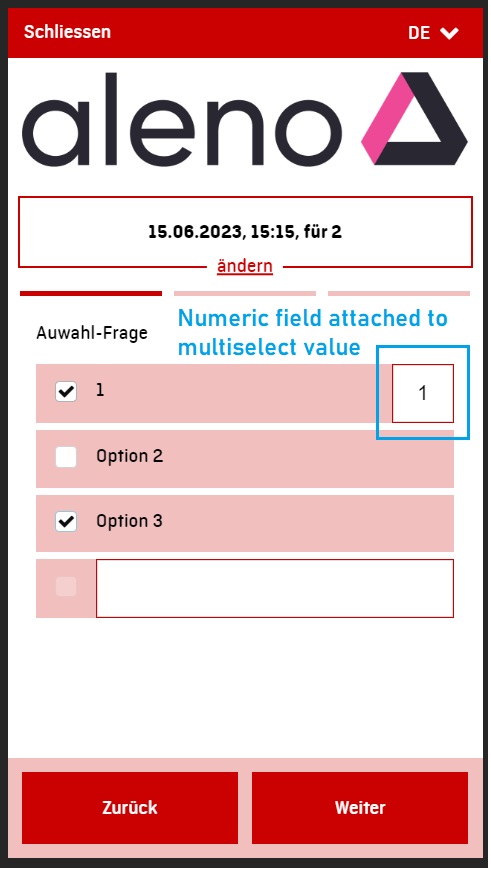
As an example of representation of checksum with checksumitems and multiselect below are screenshots from Aleno widget which covers same logic:
Checksum with checksumitems(numeric fields)
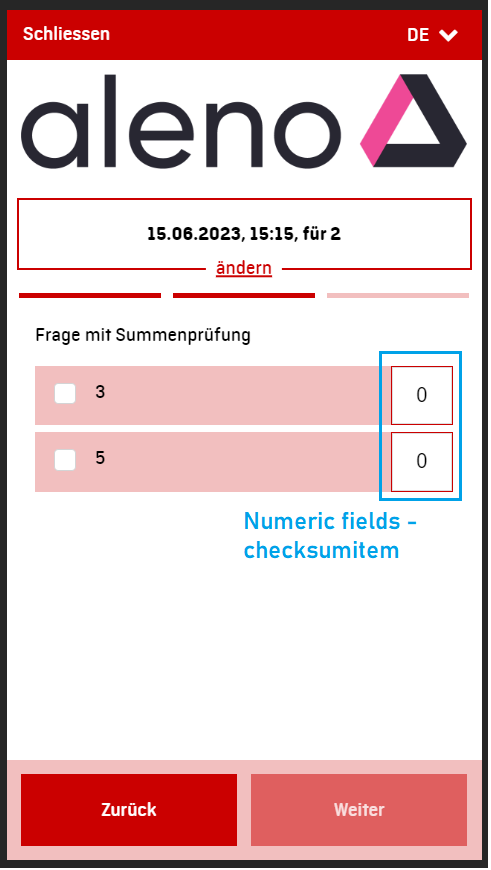
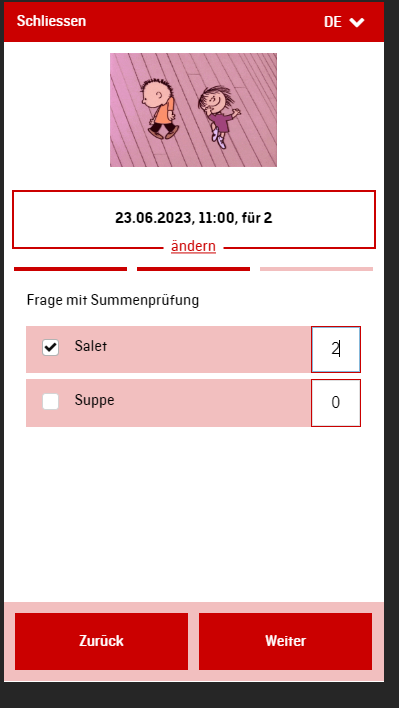
Multiselect with additional numeric fields attached to it by values
Warning
Be aware that discover.swiss currently doesn't support multiselect fields with posiibility to add custom answer unlike Aleno widget.
Example Dynamic validation
This example shows how the automatic validation works on ItemField. In the case of Zürich Card, a customer can make a ticket as it is less than 2 months in the future. If it is more than the defined rangeMax or less than rangeMin, it will result in 400 Bad Request and gives a validation error
Info
Assuming today is February the first.
{
    "orderStatus": "Placed",
    "priceCurrency": "CHF",
    "orderedItem": [
    {
        "orderQuantity": 1,
        "orderedItem": {
            "product": {
                "identifier": "nova_zurichcard24"
            },
            "validFrom": "2022-05-03T00:00:00"
        }
    }
    ],
}
POST {marketUrl}/orders
{
  //not all response is shown
  "validationMessages": [
    {
        "level": "Error",
        "message": "The field Valid from must be less than 01/05/2022 15:17:03 +00:00.",
        "orderItemNumber": "22-103915-1",
        "source": "OrderedItem"
    }
  ]
}
Example of display conditions
This example shows how a field can be gated by the value of another field. The shipping method is validated (and shown) only when the delivery mode is shipping; the pickup method only when it is pickUp.
{
  "propertyId": "deliveryMode",
  "type": "select",
  "name": "delivery Mode",
  "required": true,
  "requiredForOffers": false,
  "possibleValue": {
      "shipping": "Shipping",
      "pickUp": "Pick-up"
      }
  },
{
  "propertyId": "shippingMethod",
  "type": "select",
  "name": "shipping Method",
  "required": true,
  "requiredForOffers": false,
  "possibleValue": {
      "train": "Train",
      "plane": "Plane"
      },
  "displayConditions": [
    { "propertyId": "deliveryMode", "value": "shipping" }
  ]
},
{
  "propertyId": "pickupMethod",
  "type": "select",
  "name": "pickup Method",
  "required": true,
  "requiredForOffers": false,
  "possibleValue": {
      "station1": "Station 1",
      "station2": "Station 2"
      },
  "displayConditions": [
    { "propertyId": "deliveryMode", "value": "pickUp" }
  ]
}
Example of display condition with model
In this example the traveler field specifies that telephone is required only when the customer field telephone is not provided.
{
  "propertyId": "telephone",
  "type": "text",
  "name": "Telephone",
  "required": true,
  "requiredForOffers": false,
  "displayConditions": [
    {
      "propertyId": "telephone",
      "operator": "nullorempty",
      "model": "Customer"
    }
  ]
}
Warning
In some cases itemFields can change after the first step in the checkout page because they can be dependent on the users choices.